
DeepSeek SuperAgent Prototype: Architecture & Safety Limits
How DeepSeek's dsh-superagent-prototype routes GitHub and Feishu events to DSH worker sessions, why observe mode matters, and why workdirs are not sandboxes.
On this page
Published under deepseek-ai/dsh-superagent-prototype on October 31, 2026 (over 24,600 GitHub stars as of November 27, 2026), DeepSeek SuperAgent is a single-repository proactive coding-agent prototype built on top of DeepSeek Harness (DSH). It listens to GitHub repository events and optional Feishu messages, evaluates authorization rules in a router session, dispatches approved tickets into isolated worker checkouts, and posts results back to the original thread. Its README explicitly marks the codebase as a research prototype for reference—not an official production service.
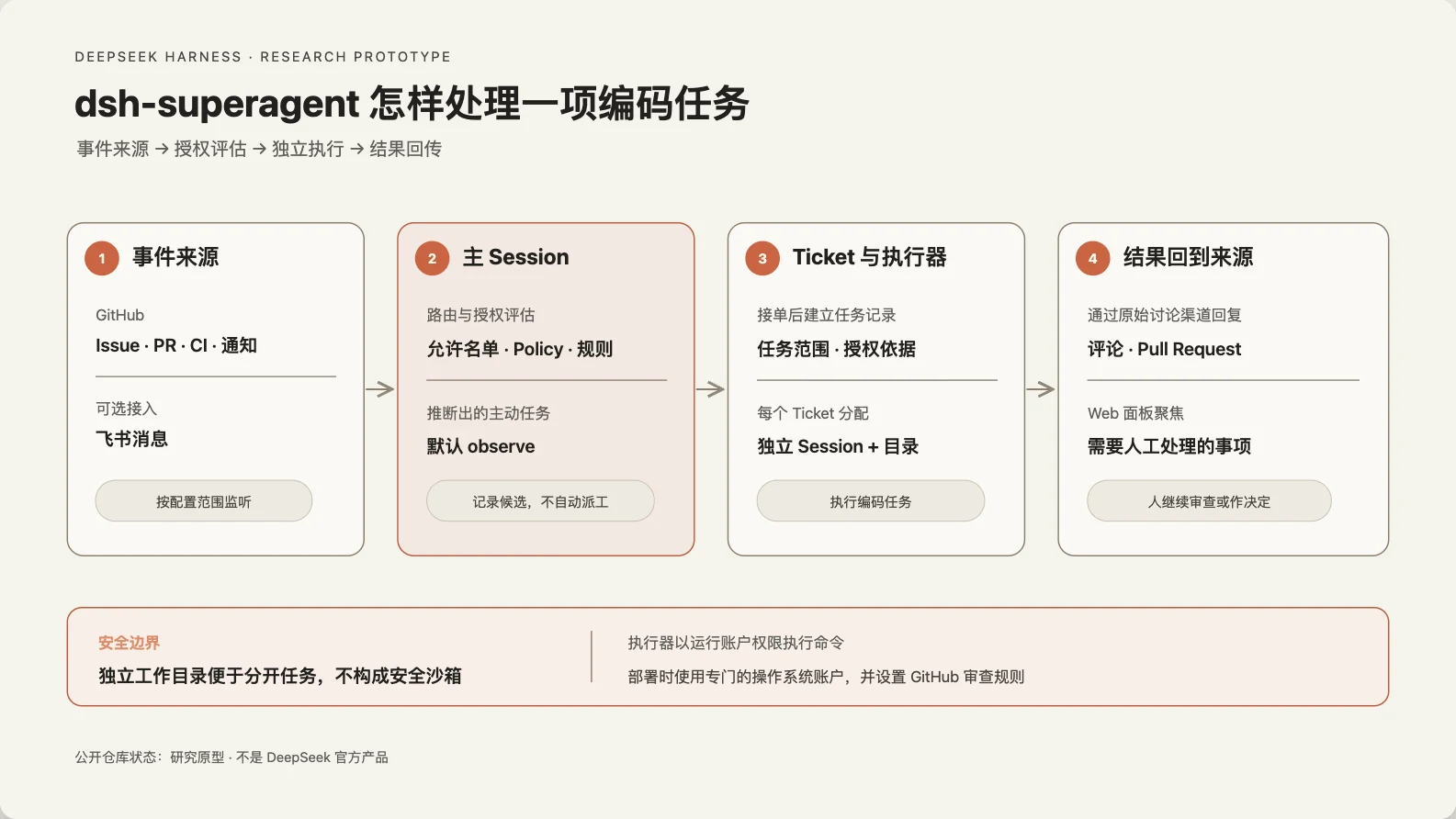
What dsh-superagent is (and how it relates to DSH)
Standard DeepSeek Harness (@deepseek-ai/dsh) is an interactive local Web UI, Desktop app, and CLI harness where a human starts sessions directly. dsh-superagent-prototype wraps that DSH runtime into an event-driven, multi-session architecture scoped to one target GitHub repository.
In the public repository, DeepSeek notes two caveats upfront: the code is a research snapshot that can contain defects, and the open-source tree does not match every internal component described in DeepSeek's accompanying architecture essay (Towards a More Autonomous Agent System). Model credentials and provider routing are still configured through the underlying DSH layer.
Section sources: dsh-superagent-prototype README, 006-deployment.md
How a repository event becomes an executed ticket
Incoming messages do not immediately trigger shell commands or code edits. Every event passes through four stages documented in the repository's domain, authorization, and execution specs:
| Stage | Component | Documented behavior |
|---|---|---|
| 1. Event intake | GitHub / Feishu sources | Receives GitHub Issues, Pull Requests, CI status changes, and notifications; Feishu chat is optional. |
| 2. Policy & observe check | Main router Session | Checks sender allowlists and source rules. Explicit mentions follow configured permissions; inferred proactive tasks default to observe (logged only, no execution). |
| 3. Ticket & checkout | Executor Session | Approved work creates a Ticket pinned to the policy version, spawns a dedicated executor Session with its own working directory, and pulls context from the subscribed thread. |
| 4. Delivery & follow-up | Original thread + Web panel | Posts comments or Pull Requests back to GitHub/Feishu, surfaces blocked decisions on a Web dashboard, and routes later review or CI events back to the same Ticket. |
Section sources: 001-domain.md, 002-authorization.md, 003-execution.md
Execution permissions and the OS security boundary
According to docs/006-deployment.md, executor sessions run under the host operating-system user with danger-full-access permissions. While each Ticket works in its own directory, the process can still read the OS user's home directory or invoke binaries via absolute paths.
- Dedicated OS account: Run the prototype inside an isolated VM, container, or dedicated non-personal OS user rather than a developer laptop holding SSH keys and cloud credentials.
- Strict sender allowlists: Restrict which GitHub or Feishu identities can move an event past authorization, because untrusted issue bodies become prompt input once accepted.
- Branch protection: Enforce human Pull Request reviews and status checks in GitHub branch protection rules rather than granting push access to protected branches.
Section sources: 006-deployment.md, 003-execution.md
Who should run dsh-superagent today (and lighter DSH alternatives)
dsh-superagent-prototype fits engineering teams studying multi-session agent routing, authorization policies, and ticket state machines who are comfortable auditing TypeScript source code and operating their own isolation layer. Start on a throwaway test repository with proactive rules kept on observe.
If you only need automated PR inspection or isolated local branches without running a full autonomous ticket daemon, standard DSH 0.2.2+ and 0.2.3-alpha already include two lighter options:
- Interactive & webhook PR reviews: Use the built-in Change requests & worktrees panel or the read-only
@deepseek-ai/dsh-webhook-githuboverlay (see our DSH Code Review & Worktrees guide). - Bounded non-interactive CI runs: Invoke
dsh --profile headlessinside an ephemeral CI container for single-task automation.
Clarifying third-party “DeepSeek Super Agent” pages
Search results for deepseek superagent mix the official GitHub prototype with third-party explainer pages such as 1min.ai. For example, 1min.ai's article summarizes the router-and-executor design and then links to 1min.AI's own hosted Code Generator, explicitly noting that 1min.AI does not host or run dsh-superagent-prototype. Verify that you are cloning github.com/deepseek-ai/dsh-superagent-prototype before configuring repository tokens or webhooks.
Section source: 1min.ai DeepSeek Super Agent overview
Common questions
Is dsh-superagent-prototype an official hosted DeepSeek product?
No. DeepSeek's repository README explicitly labels dsh-superagent-prototype an experimental research prototype published for reference rather than a supported production product.
Does each ticket's working directory act as an OS security sandbox?
No. Separate ticket directories isolate Git checkouts from colliding, but executor sessions run with danger-full-access under the host operating-system account and can read that user's home directory or execute programs by absolute path.
Why do proactive tasks default to observe mode?
Observe mode logs which incoming GitHub or Feishu events would qualify as proactive tickets without spawning executor sessions, letting maintainers audit trigger rules before allowing autonomous code runs.